
Power BI and Arbor - Attendance and Assessment Reports for the Aurora Academy Trust
Sheaf Digital has just developed two Power BI reports - attendance and assessments - for the Aurora Academies Trust. The 7 schools in the trust use Arbor and both new reports link to the trust’s Arbor data warehouse.
The reports are bespoke - designed to exactly meet Aurora’s requirements. The assessment report builds on and supports Aurora’s existing Y1-6 teacher assessment approach. That is a key benefit of a simple bespoke Power BI report - it supports what the trust is already doing, making it easier to share assessment outcomes and spot children who may need further support.
The attendance report shows:
- Attendance by academic year, academy and year group. Data for different groups - SEN, FSM etc.
- Year on year comparisons.
- Authorised, unauthorised absence.
- Student attendance - students can be filtered by attendance bands.
- Comparisons with national DfE data - similar schools.
The team at Aurora can use the assessment report to:
- EYFS stage assessments including breakdown by each of the 17 areas.
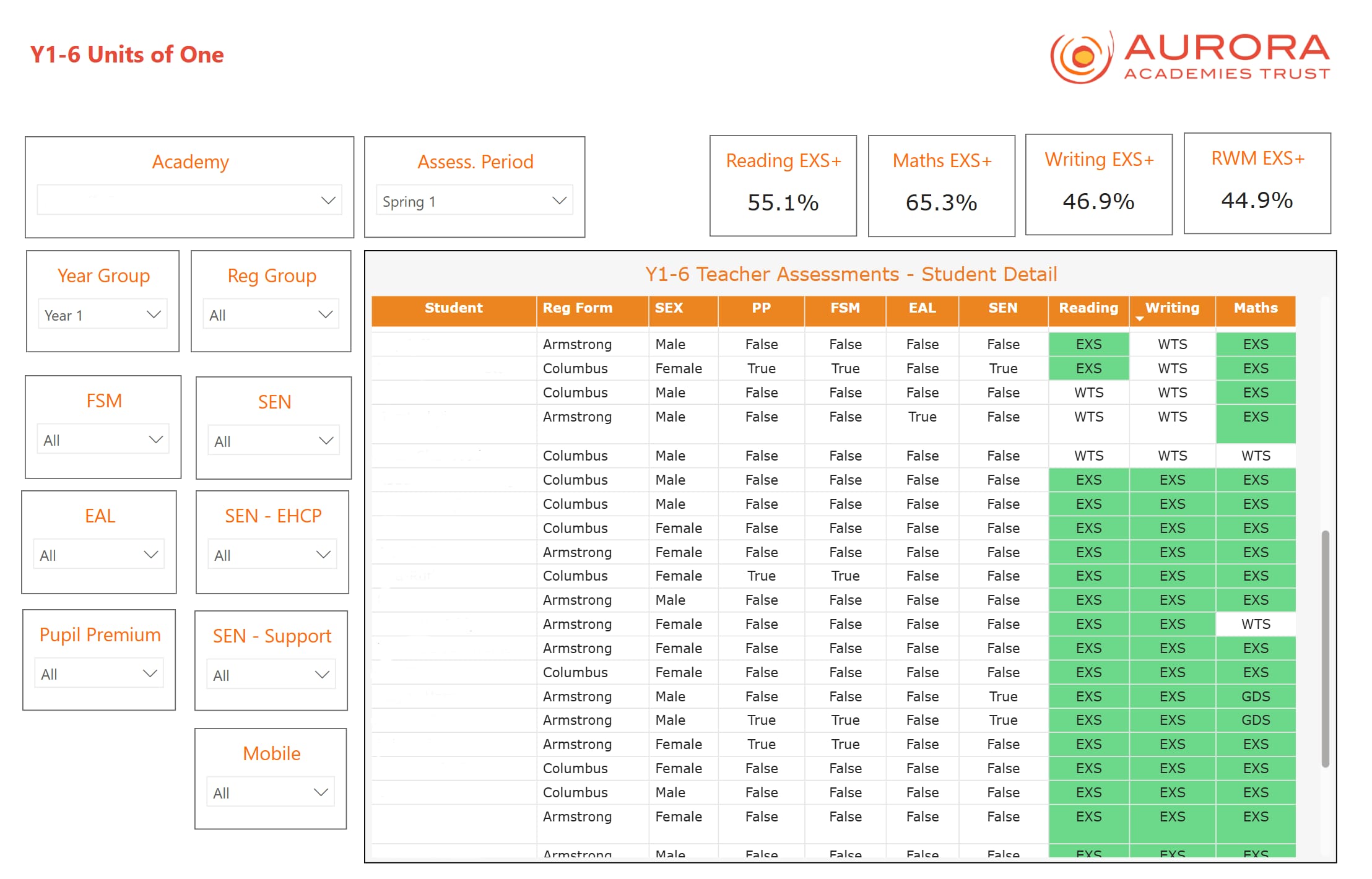
- Y1-6 teacher assessments - reading, writing & maths. Students at the expected standard or higher.
- Student level data - so staff can see at a glance who doesn’t reach the expected standard.
- Integration with data exports from Smartgrade
As part of the service, Sheaf Digital also manages Aurora’s online Power BI service, scheduling report refreshes and setting permissions so different staff members in the trust can see each report.
Why use Power BI to create a simple trust-wide reporting solution?
Reasons include:
Power BI saves time - a significant amount of time. That alone more than pays for the development costs. You can replace multiple spreadsheets with a single, interactive report. And the report is updated automatically, again time is saved because there’s no more copying and pasting between spreadsheets. Staff are freed up to actually do something with the data you collect.
This is more important - you begin to change the culture in your trust. Data becomes more accessible, more up-to-date and easier to share. For example, school level data - attendance - can be shared across the trust.
Data sharing then encourages a different kind of conversation - less defensive and more collaborative. Headteachers can see each other’s attendance data, compare attendance for different groups of children (SEN, PP, FSM etc) and then begin to talk about why different schools see different outcomes.
How does the report development process work?
Working with Aurora is like working with many clients:
- Sheaf Digital has examples of previous work.
- We understand the Arbor data warehouse - where the data is that schools typically want to see - so quite bespoke reports can be built quickly.
- We build version 1 of the report - sometimes starting from a spreadsheet that the trust already has. You get to review the report and suggest changes.
- Several iterations over 3 or 4 weeks - adding pages, visuals and supporting measures where necessary.
What next - what else can a trust do with Power BI?
Get in touch if you would like to know more about how you can use Power BI in your trust or school. You can do more with Power - integrating data from your HR system, finance and other management information systems to a single, trust wide data warehouse.
Power BI in Schools
Our bespoke support and training for schools and MATs that want to leverage the full potential of Microsoft Power BI.
Related Posts
How to use Data Dashboards in Schools to Improve Student Attendance
Power BI and iSAMS - Simplified Assessment Tracking for LVS Ascot
Power BI Assessment Tracker Reports for the Holy Cross MAC in Coventry